|
|
|
|
|
|
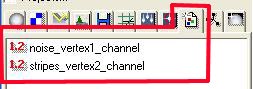
Download Example-project vertex-mapping.zip Make two custom float channels called noise_vertex1_channel and stripes_vertex2_channel. |
|
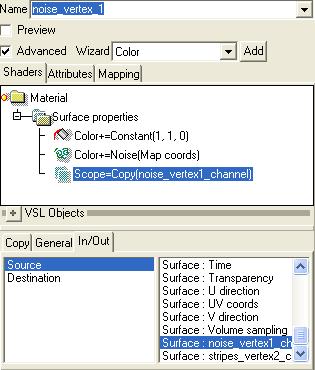
Make a new vsl-material called noise_vertex1 which contains only a surface properties shader with the following attributes: CONSTANT: yellow (colorvalue= 1,1,0 or rgb
255,255,0) and has in General a "+" set |
|
Make a parallel-mapping over the lower
left edge of the cube After this you can delete the parallel mapping or if you want to use it again put it in a hidden folder with has under properties-Gen-tab "Invisible in realtime rendering" and "Invisible in photorealistc rendering" activated.
|
|
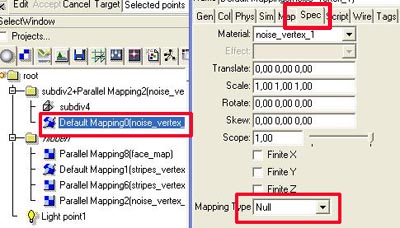
Now put a default-mapping of the noise-vertex1-material on the sds. In the properties of the mapping under spec-tab set the mapping type to Null. |
|
Select sds-cube. Switch to edit-mode
and select again the points at the the lower left edge. |
|
|
|
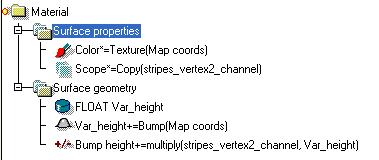
The stripes_vertex2 material The surface properties shader is a TEXTURE which is assigned like the color in
the noise-vertex1 material with a scope COPY in the channel. make a surface geometry shader like shown in the
picture . |
|
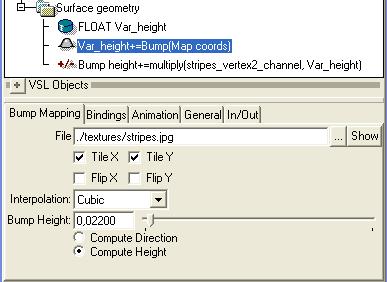
Notes to the bump object from Vesa Meskanen "1. Remember to switch off 'normalize' and 'transform to mat. space' options from the bump map object when it is used in 'surface geometry shader'. These options are related to handling direction vectors, not a height field. 2. Bump height must be now much smaller, below 0.01 or so. Cubic' type bumps produce smoothest quality." oops .. I used 0,022 .. but this also worked ..
|
|
|
Animating the vertex-map |
|
|
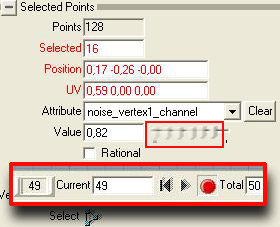
The vertex-mapping is fully animateable with the sds-object applied to. But the texture itself can also be animated. You must only keyframe the change of the value of the applied channel. For example: Download example-animation (Codec: DivX) 302 kb |
copyright © 1996 - 2002 by Boris Jahn |